Showing posts with label vulnerability. Show all posts

Wednesday, 2 September 2015

Kali Linux Tutorial: Hack A Web Browser Using BeEF

kali-linux-hack-web-browser-using-BeFF- picateshackz.com

BeEF was developed by a group of developers led by Wade Alcorn. Built on the familiar Ruby on Rails platform, BeEF was developed to explore the vulnerabilities in browsers and test them. In particular, BeEF is an excellent platform for testing a browser’s vulnerability to cross-site scripting (XSS) and other injection attacks.


Step 1: Start Cooking BeEF


BeEF is built into Kali Linux, and it can be started as a service and accessed via a web browser on your localhost.

Here is a complete tutorial about hacker's OS Kali Linux, so read this before you go ahead: An Introduction To Hacker’s OS: Kali Linux Setup Tutorial

 So let’s start by firing up Kali and cooking a bit of BeEF. Start the BeEF service by going to “Applications” -> “Kali Linux” -> “System Services” -> “BeEF” -> “beef start.”

kali-linux-hack-web-browser-using-BeFF- picateshackz.com


Step 2: Opening a Browser to BeEF


The BeEF server can be accessed via any browser on our localhost (127.0.0.1) web server at port 3000. To access its authentication page, go to:

http://localhost:3000/ui/authentication
The default credentials are “beef” for both username and password.

kali-linux-hack-web-browser-using-BeFF- picateshackz.com

Great! Now you have successfully logged into BeEF and are ready to begin using this powerful platform to hack web browsers.

Note that in the screenshot below that my local browser, 127.0.0.1, appears in the left hand “Hooked Browsers” explorer after I clicked on the link to the demo page. BeEF also displays its “Getting Started” window to the right.

kali-linux-hack-web-browser-using-BeFF- picateshackz.com


Step 3: Viewing Browser Details


If I click on the local browser, it will provide with more choices to the right including a “Details” window where we can get all the particulars of that browser. Since I am using the Iceweasel browser built into Kali, which is built upon Firefox, it shows me that the browser is Firefox.

It also shows me the version number (24), the platform (Linux i686), any components (Flash, web sockets, etc.), and more information that we will be able to use in later web application hacks.

kali-linux-hack-web-browser-using-BeFF- picateshackz.com


Step 4: Hooking a Browser


The key to success with BeEF is to “hook” a browser. This basically means that we need the victim to visit a vulnerable web app. This injected code in the “hooked” browser then responds to commands from the BeEF server. From there, we can do a number of malicious things on the victim’s computer.

BeEF has a JavaScript file called “hook.js,” and if we can get the victim to execute it in a vulnerable web app, we will hook their browser! In future tutorials, we will look at multiple ways to get the victim’s browser hooked.

In the screenshot below, I have “hooked” an Internet Explorer 6 browser on an old Windows XP on my LAN at IP 192.168.89.191.

kali-linux-hack-web-browser-using-BeFF- picateshackz.com


Step 5: Running Commands in the Browser


Now, that we have hooked the victim’s browser, we can use numerous built-in commands that can executed from the victim’s browser. Below are just a few examples; there are many others.


  • Get Visited Domains
  • Get Visited URLs
  • Webcam
  • Get All Cookies
  • Grab Google Contacts
  • Screenshot

In the screenshot below, I selected the “Webcam” command that many of you may be interested in. As you can see, when I execute this command, an Adobe Flash dialog box will pop up on the screen of the user asking, “Allow Webcam?” If they click “Allow,” it will begin to return pictures from the victim’s machine to you.

Of course, the text can be customized, so be imaginative. For instance, you could customize the button to say “You have just won the lottery! Click here to collect your winnings!” or “Your software is out of date. Click here to update and keep your computer secure.” Other such messages might entice the victim to click on the box.

kali-linux-hack-web-browser-using-BeFF- picateshackz.com


Step 6: Getting Cookies


Once we have the browser hooked, there is almost unlimited possibilities of what we can do. If we wanted the cookies of the victim, we can go to “Chrome Extensions” and select “Get All Cookies” as shown in the screenshot below.

kali-linux-hack-web-browser-using-BeFF- picateshackz.com

When we click on the “Execute” button to the bottom right, it will begin collecting all the cookies from the browser. Obviously, once you have the user’s cookies, you are likely to have access to their websites as well.

BeEF is an extraordinary and powerful tool for exploiting web browsers. In addition to what I have shown you here, it can also be used to leverage operating system attacks. We will be using it and other tools in my new series on hacking web applications, mobile devices, and Facebook, so keep coming back, my greenhorn hackers.


Monday, 24 August 2015

New Android Vulnerable - Hackers To Take Over Your Phone

New Android Vulnerable  to Hackers- picateshackz.com

This time Everything is Affected!

Yet another potentially dangerous vulnerability has reportedly been disclosed in the Google's mobile operating system platform – Android.

Android has been hit by a number of security flaws this month, including:
  •  Stagefright vulnerability that affects 950 Million Android devices worldwide
  • A critical mediaserver vulnerability that threatened to crash more than 55 percent of Android devices
  • Another critical flaw (CVE-2015-3842) discovered last week, affected almost all the versions of Android devices
This time the issue resides in the multitasking capability of the Android phones, the ability to run more than one app at a time.

The security flaw gives hacker ability to spy on Android smartphone owners, steal login credentials, install malware, and many more, according to the latest research conducted by the researchers at thePennsylvania State University and FireEye.

How the Attack Works?


According to security researchers, the flaw could be exploited to lure the victim into unwittingly handing over their login details into a spoofed user interface, controlled by a hacker, when an Android user starts an app.

The device owner won't at all be aware that they are typing their sensitive details into a malicious software program masquerading as a legit Android app.

The researchers published their research in a paper titled, "Towards Discovering and Understanding Task Hijacking in Android" [PDF], which they presented at the USENIX Security 15 conference in Washington DC last week.

The study explained practical details of how multitasking within Android differs from multitasking within desktop operating systems that focused on what happens when an app or multiple apps run in one or multiple processes simultaneously creating Multi-Tasks.

Multitasking in Android allows us to gain advantage in a way:
  • By being able to switch between the apps
  • Apps being able to maintain their state in the background
  • Easy task or app switching

Task Hijacking Attacks on Large Scale


Android task management mechanism is threatened by severe security risks. When maltreated, these convenient multitasking features can backfire and initiate task hijacking attacks on a vast scale.

The researchers analyzed more than 6.8 Million apps from multiple Android app stores and found that the task hijacking flaw is prevalent in all apps. Since many Android apps depend on "the current multitasking design, defeating task hijacking is not easy."

The researchers also claimed that the vulnerability can impersonate the user interface of the app, which is controlled by the attacker on the other hand.

You can watch the video to find the quick overview of the vulnerability.


This is just one scenario where the attacker is deploying phishing attack on Android users, and gaining their privacy credentials.

Yet More to Come

There can be instances where the users can be the victims of RansomwareDistributed Denial of Service (DDoS) attacks and other cyber attacks.

The five security researchers – Peng Liu and Chuangang Ren from the Pennsylvania State University, and Yulong Zhang, Tao Wei and Hui Xue from FireEye – involved in the research reported the security hole to the Android team.
"We appreciate this theoretical research as it makes Android's security stronger," said a Google spokeswoman.
You are safe as; as Google said that customers are protected from hijacking and phishing attacks withAndroid's Verify Apps and Safety Net features.

Also, you can keep yourself safe by installing apps from trusted sources and keeping your safety completely with you.

Monday, 6 July 2015

Kali Linux Tutorial: Finding Exploits Using the Searchsploit Tool

kali-tutorial-find-exploits-searchsploit- picateshackz.com


What is Vulnerability Exploit?


Words like "exploit" and "vulnerability" are tightly bound together. Often, a script/program will exploit a specific vulnerability. Since most vulnerabilities are exploited by script kiddies, the vulnerability is often known by the name of the most popular script that exploits it. In any case, there are broad-spectrum vulnerability scanners/assessment tools that will scan a system and look for common vulnerabilities. These are often used in order to toughen up a computer system.

In computer security, the term vulnerability is applied to a weakness in a system that allows an attacker to violate the integrity of that system. Vulnerabilities may result from weak passwords, software bugs, a computer virus or a script code injection, and a SQL injection.

Introduction


When we are looking for ways to hack a system, we need a specific exploit to take advantage of a certain vulnerability in the operating system, service, or application.

Remember, exploitation is very specific, there is no one silver bullet that will allow you to exploit all systems. You need to find an exploit that will specifically take advantage of a vulnerability in the system that you are attacking. That is where the Exploit Database (www.exploit-db.com) 
can be so incredibly useful.

EDB is a project of Offensive Security, the same folks who developed BackTrack and Kali Linux, which includes exploits categorized by platform, type, language, port, etc. to help you find the exploit that will work in your particular circumstance. Then, if you feel it will work on your target, you can simply copy and paste it into Kali for your attack.


Step 1: Fire Up Kali & Open a Browser


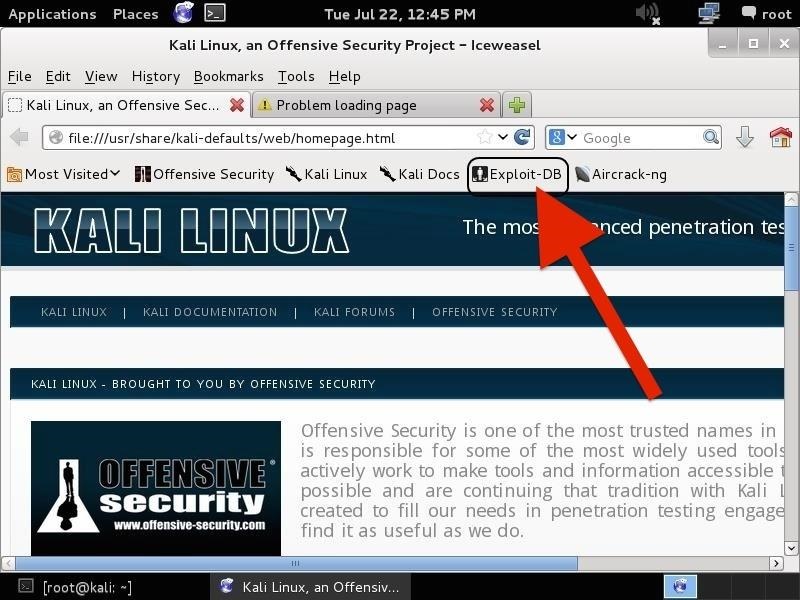
Let's start by firing up Kali and opening a browser, such as Iceweasel, the default browser in Kali (EDB can be reached from any browser, in any operating system). If we use the default browser in Kali, we can see that there is a built-in shortcut to the "Exploit-DB" in the browser shortcut bar, as seen below.


kali-tutorial-find-exploits-searchsploit- picateshackz.com


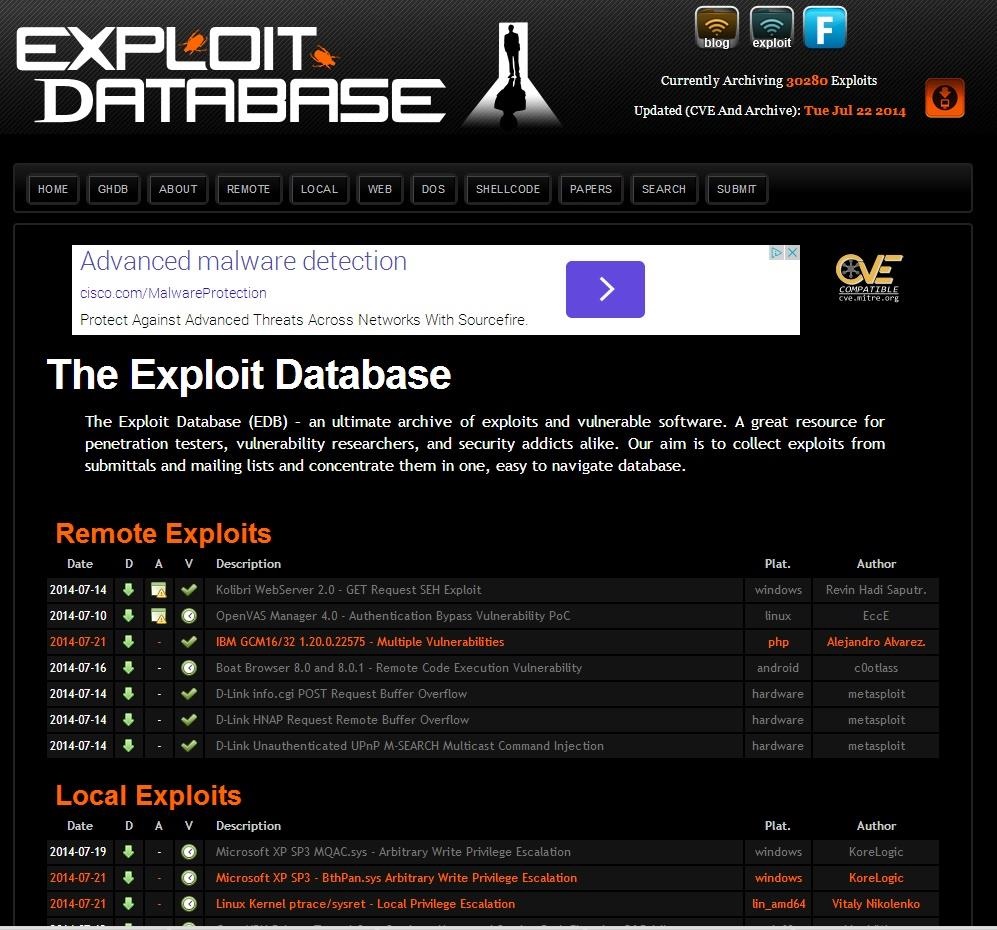
When we click on it, it takes us to the Exploit Database, as seen below.


kali-tutorial-find-exploits-searchsploit- picateshackz.com


If you are not using Iceweasel and its built-in shortcut, you can navigate to Exploit-DB by typing www.exploit-db.com in the URL bar.


Step 2: Search the Exploit Database


If we look at the top menu bar in the Exploit Database website, second from the right is a menu item called "Search". When we click on it, it enables us to search the database of exploits and returns a search function screen similar to the screenshot below.


kali-tutorial-find-exploits-searchsploit- picateshackz.com


Let's use this search function to find some recent Windows exploits (we are always looking for new Windows exploits, aren't we?). In the search function window, we can enter any of the following information;


  • Description
  • Free Text Search
  • Author
  • Platform (this is the operating system)
  • Type
  • Language
  • Port
  • OSVDB (the Open Source Vulnerability Database)
  • CVE (Common Vulnerability and Exploits)

The last two fields can be used if you are specifically looking for an exploit that takes advantage of a known, numbered vulnerability in either of those databases.

In the Platform field, enter "Windows", in the Type field, enter "remote", and in the Free Text Search box, enter "Office". When we do so, the Exploit Database returns a list and a link to all of the exploits that meet those criteria. Of course, you can put in whatever criteria you are searching for. I am only using these as an example.

kali-tutorial-find-exploits-searchsploit- picateshackz.com


Step 3: Open an Exploit


From the search results page, we can click on any of the two pages of search results and it will take us to the particular exploit. I clicked on the very first exploit in the list "Internet Explorer TextRange Use-After Free (MS14_012)". When I do so, I am brought to a screen that displays the exploit code like that below. I have circled the description in the code of the exploit.


kali-tutorial-find-exploits-searchsploit- picateshackz.com


This exploit works against Internet Explorer that was built between August 2013 and March 2014. If you want to use it, you can simply copy and paste this text file and put it into the exploit directory in Metasploit (if you are using an up-to-date version of Metasploit, it is already included). This is a good example of how specific an exploit can be.
Step 4: Open Up Searchsploit

Kali, having also been developed by Offensive Security, has built into it a local database of exploits based on the same Exploit Database. We can access it by going to Applications -> Kali Linux -> Exploitation Tools -> Exploit Database and clicking on searchsploit as shown below.

kali-tutorial-find-exploits-searchsploit- picateshackz.com


It will open a screen like that below that details the basic syntax on how to use searchsploit. Note that it explains that you must use lowercase search terms and that it searches a CSV (comma separated values) file from left to right, so search term order matters.

kali-tutorial-find-exploits-searchsploit- picateshackz.com


Step 5: Search the Exploit Database with Searchsploit


Now that we have opened a terminal for searchsploit, we can now use this tool to search our local copy of the Exploit Database. As you might expect, our local copy of the exploit database is much faster to search, but does NOT have all the updates that the online database does. Despite this, unless we looking for the very latest exploits, the local database works fast and is effective.

One other note on its use. As the information is organized in CSV files, searches locally often will yield results slightly differently than the online database. In the screenshot below, I searched for "Windows" and "Office" and only received a single result, unlike what I received when I used the online database.

kali-tutorial-find-exploits-searchsploit- picateshackz.com


Exploit Database is an excellent repository for exploits and other hacks that we might need, including new Google hacks, white papers on security and hacking, denial of service (DOS) attacks, and shellcode that you can use out the box or tailor for your unique attack.


Recommended Articles To Become A Hacker:

Friday, 3 July 2015

Android Browser - Address Bar and Content Spoofing Vulnerability

android_address_content_spoofing- picateshackz.com


Address Bar Spoofing Vulnerability

Google security team themselves state that "We recognize that the address bar is the only reliable security indicator in modern browsers" and if the only reliable security indicator could be controlled by an attacker it could carry adverse affects, For instance potentially tricking users into supplying sensitive information to a malicious website due to the fact that it could easily lead the users to believe that they are visiting is legitimate website as the address bar points to the correct website.

Few months ago it discovered an address bar spoofing vulnerability affecting Android Stock Browser on all Android versions. The tests were carried out on Android Lollipop and later were confirmed on prior versions.

The issue is caused due to the fact that the browser fails to handle 204 error "No Content" responses when combined with window.open event and therefore allowing us to spoof the address bar.


Steps To Reproduce

1) Visit http://jsfiddle.net/dy4swq4o/show/ with Unpatched Android Stock Browser.

2) click the "Click here to be redirected" button

3) Android browser will open a new tab with the browser pointing to "http://www.google.com/csi" in the address bar, which makes the victim believe that they are infact visiting a legitimate website, however in reality the page is not hosted on google.com. 

4) As soon as the victim enters his/her credentials, they are sent to attacker.com.


Note: Please visit https://jsfiddle.net/dy4swq4o/ for unrendered version of the POC.


Proof of Concept

The following is a screenshot of Samsung Galaxy S5 running latest android stock browser, as you may notice that the address bar points to https://www.google.com/csi (Which returns a 204 response), which makes the user believe that he is infact visiting a legitimate site however it's hosted on attacker's domain name. 

android_address_content_spoofing- picateshackz.com

Notes: Joe Vennix suggests that you might have to play with my timeout value , and he found 1500 - 2000 to work much more consistently. This issue is due to the fact that, In case if the timeout fires too soon (before the NO CONTENT response is received from gmail.com), the new page will just have a blank URL bar.


Credits

The proof of concept was initially created by "Rafay Baloch", however it was later modified and improvised by "Joe Vennix" and "Tod Beardsley" from Rapid7 team handling the disclosure.


Mitigation

The Android security team has responded by releasing patches committed to both Kitkat and Lollipop main distributions. Users are advised to contact their carriers to determine if they have received updated versions of these operating systems."


Kitkat Content Spoofing Vulnerability

The following is a low risk vulnerability that was found few months ago while testing the latest Android Stock browser on Android Kitkat. The issue that was found is commonly referred as Content spoofing Vulnerability or dialog box spoofing vulnerability which could be used to fake an alert message on a legitimate website.

In other words, we could display an alert box (Of our choice) on the site of our choice. Whereas in chrome, Firefox and other browser the alert box appears on correct tab.


POC

<a onclick="test()">CLICK</a>
<script> function test()
{ window.open('http://bing.com/') setTimeout (function(){alert("HACKED");}, 5000) }
</script>


Upon executing the above code, the alert box would be displayed on bing.com.

android_address_content_spoofing- picateshackz.com

Technical Details

The issue resides inside of the ASOP browser, and more specifically due to the fact the webview fails to overwrite the WebChromeClient.onJsAlert() method which is responsible for displaying the javascript alert box and this way webview is not able to switch the JsAlert() to the correct tab.